Mecha Pilot Interface View Concept Art
Create Mecha Pilot Interface View concept art pieces with AI — describe anything and get a widescreen concept art in seconds.
Rendered in Mecha Pilot Interface View at 1536×864 — learn about this style
Why Mecha Pilot Interface View Works for Concept art pieces
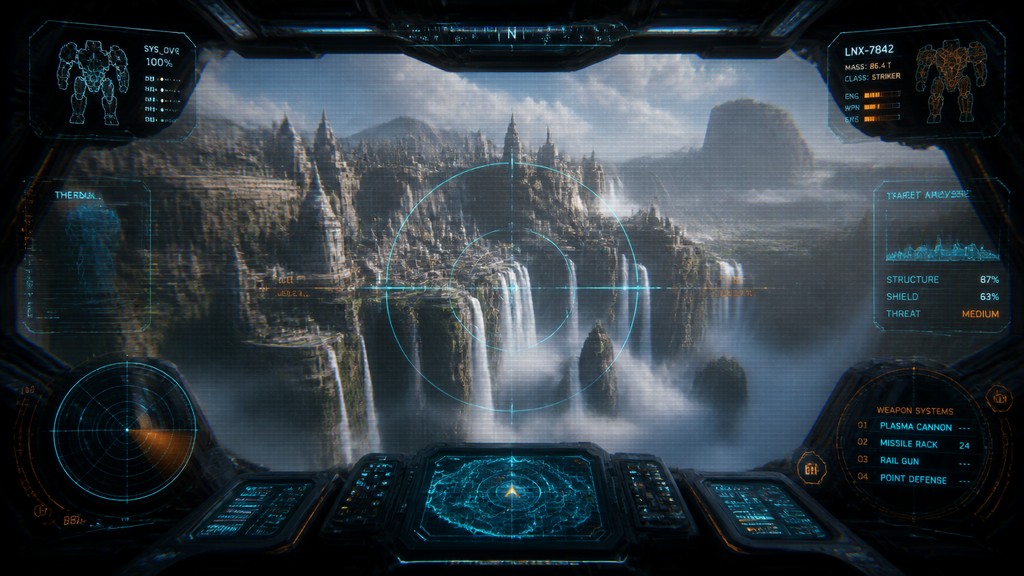
Futuristic cockpit view with HUD overlays, targeting reticles, holographic readouts, and mecha interface framing the subject.
- ✦Cockpit framing: The subject is seen as though through a mecha canopy or control station, with dark peripheral shadows and curved glass reflections enclosing the composition. This framing makes the viewer feel like the pilot rather than an outside observer.
- ✦HUD overlays: Layered interface elements such as reticles, labels, bars, and diagnostic panels sit over the image instead of beside it. These graphics imply targeting, navigation, and machine status information.
- ✦Glowing interface colors: Cyan and orange are especially common because they read clearly against dark backgrounds and suggest advanced electronics. Red is often used sparingly for warnings, locks, and alerts.
Those qualities translate directly into concept art pieces: the style stays readable at wide banner formats, and every generation is unique to your prompt. Want the full picture? Explore the Mecha Pilot Interface View guide →
How It Works
Describe it
Type what you want your concept art to show.
Generate
The AI renders it in Mecha Pilot Interface View at 1536×864 — regenerate and refine as much as you like.
Download & use
Save your concept art and use it anywhere.
Frequently Asked Questions
How do I make a Mecha Pilot Interface View concept art?
Type what you want into the generator (or upload a photo), and it renders your concept art in Mecha Pilot Interface View at 1536×864 — sized and framed for concept art pieces. You can iterate as many times as you like until it's right.
Is the Mecha Pilot Interface View concept art maker free?
You can try it free — every new account gets credits to generate. No design skills or software needed.
Can I use my own photo?
Yes — switch to Image to Image mode, upload a photo, and it will be transformed into Mecha Pilot Interface View while keeping your subject and composition.
What size is the concept art?
Concept art pieces generate at 1536×864 pixels (16:9 widescreen), and you can upscale or re-generate at other sizes in the generator.







