Renaissance Jewelry Design Banner Maker
Create Renaissance Jewelry Design banners with AI — describe anything and get a widescreen banner in seconds.
Rendered in Renaissance Jewelry Design at 1536×864 — learn about this style
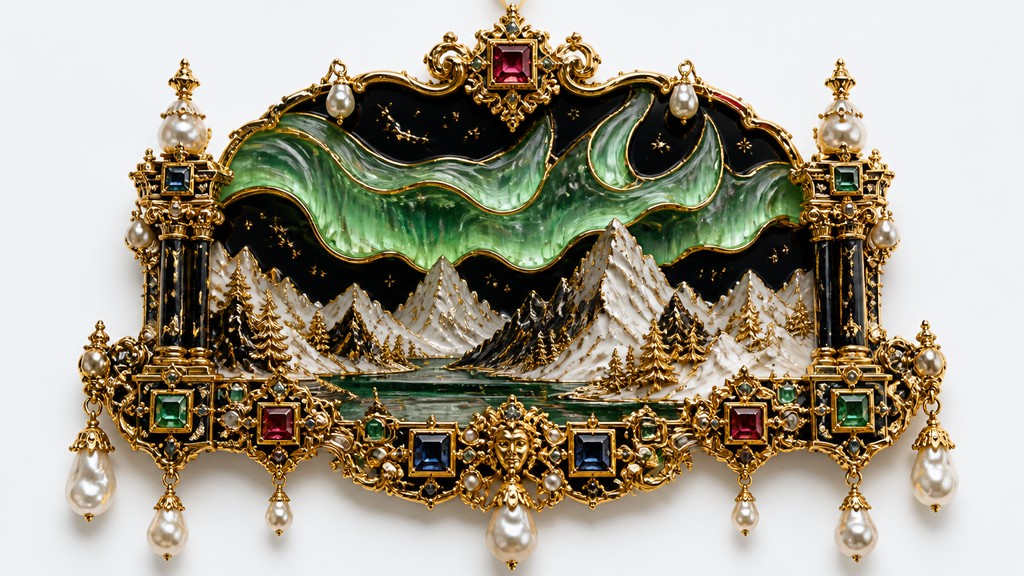
Why Renaissance Jewelry Design Works for Banners
16th-century court jewelry in gold, enamel, pearls, and table-cut gems: princely Renaissance ornament with sculptural detail.
- ✦Ronde-bosse enamel: Small sculptural forms are covered in opaque enamel so they appear fully modeled in color, not merely outlined. This gives figures, beasts, and floral motifs a jewel-like, almost miniature-statue presence.
- ✦Baroque and pear-shaped pearls: Irregular pearls are used as bodies, drops, faces, or pendants, taking advantage of their organic silhouettes. Their asymmetry adds liveliness and a sense of natural wonder.
- ✦Table-cut gemstones: Rubies, emeralds, and sapphires are often cut with flat tops and geometric facets, then set in raised collets. The look is crisp, reflective, and deliberately architectural rather than brilliant-cut.
Those qualities translate directly into banners: the style stays readable at wide banner formats, and every generation is unique to your prompt. Want the full picture? Explore the Renaissance Jewelry Design guide →
How It Works
Describe it
Type what you want your banner to show.
Generate
The AI renders it in Renaissance Jewelry Design at 1536×864 — regenerate and refine as much as you like.
Download & use
Save your banner and use it anywhere.
Frequently Asked Questions
How do I make a Renaissance Jewelry Design banner?
Type what you want into the generator (or upload a photo), and it renders your banner in Renaissance Jewelry Design at 1536×864 — sized and framed for banners. You can iterate as many times as you like until it's right.
Is the Renaissance Jewelry Design banner maker free?
You can try it free — every new account gets credits to generate. No design skills or software needed.
Can I use my own photo?
Yes — switch to Image to Image mode, upload a photo, and it will be transformed into Renaissance Jewelry Design while keeping your subject and composition.
What size is the banner?
Banners generate at 1536×864 pixels (16:9 widescreen), and you can upscale or re-generate at other sizes in the generator.